Auto Text - Schedule Messages
Bizcraft AppsCommunication
4.54.38K Reviews
- Version
- 6.0.8
- Installs
- 1.00M
- Age Rating
- Everyone
Screenshots
Our Review of Auto Text - Schedule Messages
 Analysis by Appyee
I like the idea behind Auto Text - Schedule Messages: it gives messages a place in my day before I get busy, rather than relying on memory at the exact moment they need to go out. That makes it useful for practical reminders as well as thoughtful check-ins. My overall view is positive, with one important caveat: scheduled communication is only dependable when the app, device, and chosen messaging service are all ready to do their part.
Where scheduling earns its place
The most useful way to think about Auto Text is as a planning tool, not a replacement for an ordinary conversation. I would use it for a message whose timing matters but whose wording is already clear: a reminder to a family member, a follow-up to a customer, or a greeting I might otherwise forget during a hectic day. Writing it in advance also gives me a chance to check the recipient and wording while I am not rushing.
For example, imagine I remember on Sunday evening that a friend has an early appointment on Monday. I can prepare a supportive note then and arrange for it to arrive at a more suitable time, rather than sending it late at night or hoping I remember after waking up. The value is not that the app knows what I mean; it is that I can decide in advance what I want to say and when I want to say it.
A practical fit, with sensible boundaries
Auto Text is a communication app from Message Assistant. It is free to install, is rated for Everyone, and has a 4.6 average from around 32,000 ratings, with more than a million installs. Those figures suggest it has found an audience among people who want a dedicated way to plan texts, but popularity alone cannot tell me whether its workflow suits every phone or messaging habit.
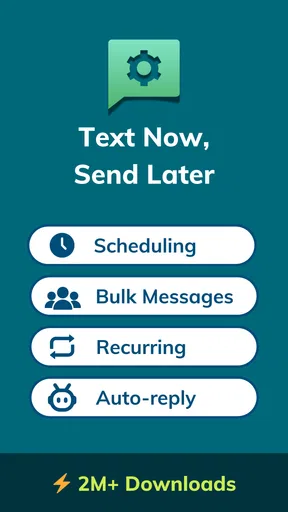
The app’s central appeal is the combination of SMS and WhatsApp scheduling with automatic replies and bulk messaging. That mix can be handy if I manage several kinds of routine communication from one place. It also means I would approach it differently from a basic reminder app: a reminder tells me to act, while a message scheduler is intended to prepare the communication itself. Before trusting it with anything time-sensitive, I would make a low-stakes test message and check how the chosen sending method behaves on my device.
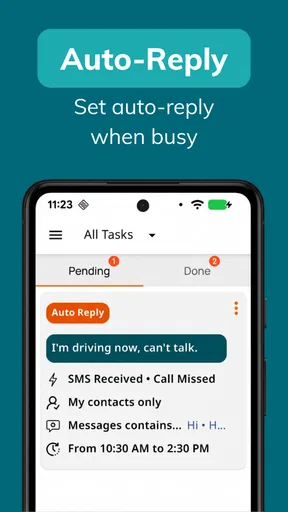
There is also a useful distinction between a scheduled message and an automatic reply. A scheduled message is something I compose ahead of time; an auto reply is intended to respond under conditions I configure. I would keep the latter narrow and neutral, especially for work or family chats, so an automatic response does not imply that I have read or understood a message when I have not. For a sensitive conversation, a personal reply is still the better choice.
What to check before relying on it
Automation can save a little mental effort, but it adds a new task: checking that the message is correct before it goes out. I would review the recipient, channel, wording, and scheduled time whenever I create a message, and revisit any item that has become outdated. A reminder intended for one person can feel awkward if a group or old contact is selected by mistake, and a once-relevant message can become confusing if plans change.
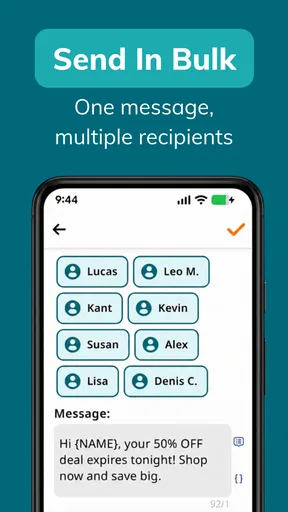
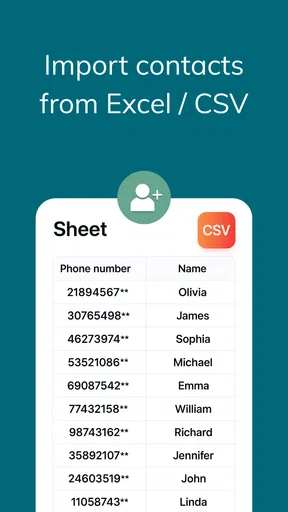
Bulk messaging deserves particular care. It can make repeated announcements less tedious, but sending the same wording to many people may feel impersonal, and a mistake can reach more recipients at once. I would use it for information people genuinely expect, keep the text clear about who is contacting them, and avoid treating a larger send as a substitute for consent or good judgement.
Auto Text is not the right fit for every situation. If I only need an occasional nudge to remember a birthday, a calendar or reminder app may be simpler and less involved. If I want the quickest possible back-and-forth, the messaging app I already use is usually the natural choice. This app makes more sense when planning, recurring communication, or a specific send time is a frequent need.
In-app purchases range from $5.99 to $59.99 per item, so although the app is free to start, I would look carefully at what is included before choosing any paid option. Its current version is 5.9.8 and it requires Android 7.0 or later. I would check that the version available for my device supports the workflow I intend to use, rather than assuming that every messaging action works identically across devices.
Setting Up and Getting Started
Diving straight into Auto Text - Schedule Messages was a breeze. The installation process was super straightforward on both Android and iOS. Once you have it up and running, the app welcomes you with a clean, intuitive interface. I love how everything is laid out in a way that just makes sense, even if you’re not tech-savvy.
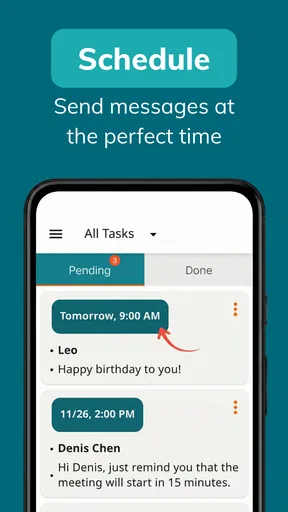
To schedule a message, you simply hit the "New Message" button. From there, it’s all about filling in the details: recipient, message content, and the time you want it sent. The interface is pretty self-explanatory, which I totally appreciate. No need for a manual here!
Features That Stand Out
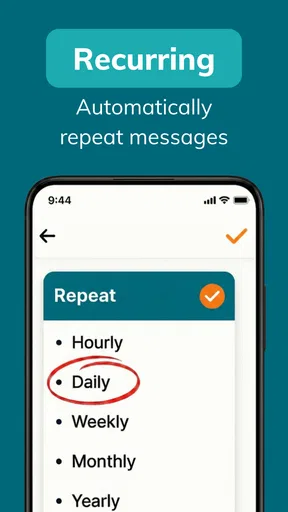
What really caught my eye are the nifty features tucked into this app. You can set up recurring messages, which is a lifesaver for those weekly reminders or those "Happy Friday!" texts. Plus, it supports multiple languages, so you can reach out in the language your heart desires.
Another feature I found super handy is the "Send Later" option. Imagine crafting a message at 2 AM and setting it to send at 9 AM. It’s like magic! The app even allows you to attach images and emojis, so your messages can be as expressive as you want.
Making repeat messages less repetitive
Recurring messages are most useful when the underlying information stays the same, such as a regular check-in or a predictable reminder. I would avoid setting a recurring note for details that change from week to week unless I can review each send in time. A short, stable message is less likely to become misleading than a detailed one that assumes plans have not changed.
For a routine reminder, I would also think about how the recipient experiences it. A repeated message can be helpful if the person expects it, but tiring if it arrives too often or sounds like an automated demand. Keeping the wording friendly and specific makes the convenience feel considerate rather than mechanical. If the reminder is no longer needed, reviewing the schedule matters as much as creating it.
Support for multiple languages is a practical plus when I communicate with people in different language communities. I would still proofread names, accents, and phrasing before scheduling: a message composed in advance has the same potential for a typo as one sent manually, and automation makes it easier for that typo to travel at the intended time without another glance.
Performance and Reliability
Now, let’s talk about how it performs. During my week-long test, Auto Text - Schedule Messages never missed a beat. Every message went out exactly when scheduled, which is crucial for an app like this. It runs smoothly in the background and doesn’t hog battery life, so no worries about extra charges or random shutdowns.
On a couple of occasions, I did notice a slight lag when scheduling messages with lots of emojis or images, but it was nothing major. Just something to keep in mind if you’re planning to send a digital novel.
Reliability is a workflow, not just a promise
My practical advice is to begin with a message that would not cause trouble if it arrived a little late or needed to be sent manually. That small trial helps me understand the app’s behavior on my own setup before I use it for an appointment reminder or a work update. I would also leave enough time to notice if a scheduled item needs attention, rather than creating it at the last minute and assuming there is nothing else to check.
For important communication, I would keep a backup plan. A calendar alert can remind me to verify that a high-priority message went out, or prompt me to send it myself if the timing is critical. That may sound less effortless than full automation, but it is a sensible trade-off when missing a message would matter. For casual greetings, I would be comfortable relying on a simpler routine after I have tested it.
The choice between automatic sending and a prompt before sending is also a choice between convenience and control. Auto-send suits routine notes that are unlikely to need last-minute editing. A confirmation prompt is safer when the message depends on changing plans, current details, or a recipient I want to double-check. I would choose the setting based on the cost of a mistake, not just on how many taps I can save.
User Experience and Design
The design is minimalistic, which I’m all for. It keeps things simple and clutter-free. The navigation is seamless, and I appreciate the small touches like the dark mode option, which is easy on the eyes at night.
The app also offers customization options. You can tweak notification settings, and choose whether to auto-send or prompt before sending. It gives you control, which is always a plus in my book.
Keeping a scheduled message clear
A tidy schedule depends on being able to recognize what each item is for later. I would make the message itself clear enough to distinguish from similar reminders and avoid composing several nearly identical entries in a hurry. If a plan changes, I would review the queued communication rather than assuming a previously scheduled note will still make sense.
Dark mode and a straightforward layout are pleasant, but the more meaningful design choice is the option to decide how much automation I want. People who prefer to inspect a message right before it goes out can keep that final check in their workflow; people handling predictable, low-risk notes may value fewer steps. Neither approach is universally better, and the app is more useful when its controls match the kind of message being sent.
Who Would Love This App?
If you're someone who struggles with remembering to send messages or just wants to streamline your communication, this app is a game changer. It’s perfect for busy professionals, forgetful friends, or even just the average Joe who wants to be more organized with their texting. It’s also a fantastic tool for businesses to send out scheduled updates or promotions.
The app is also designed with accessibility in mind, making it user-friendly for everyone, including those with visual impairments. It’s a testament to how inclusive tech can be.
Who should choose another approach
I would recommend Auto Text most to people with repeatable communication needs: someone who sends routine reminders, a small business owner who plans straightforward updates, or a person who likes preparing messages outside the hours they should arrive. It can also suit anyone who wants to write a note while they remember it, then deliver it at a more considerate time.
I would hesitate to recommend it as the only safeguard for urgent or sensitive communication. A direct conversation is better when the recipient may need an immediate answer, and a calendar reminder is better when the important thing is to remember a task rather than send fixed wording. Anyone who rarely schedules texts may find that opening a dedicated app adds more steps than it removes.
Compared with the usual alternatives, Auto Text occupies a middle ground. A basic reminder app is flexible and can prompt me to send a message in my own words, but it does not prepare that message for delivery. A standard messaging app is better for live conversation, while Auto Text is aimed at communication I can plan ahead. That distinction is the reason to install it, not a reason to replace the messaging apps where my conversations already happen.
Final Thoughts
All in all, Auto Text - Schedule Messages is a powerhouse of an app that delivers exactly what it promises. It takes the stress out of remembering to send messages and does so with style and efficiency. Whether you're sending birthday greetings, reminders, or marketing messages, this app has got your back.
So, if you’re ready to boost your messaging game, give it a try. Trust me, once you start using it, you’ll wonder how you ever managed without it. Happy texting!
My recommendation is more measured: I would try it if I regularly prepare SMS or WhatsApp messages ahead of time, and I would begin with simple, low-stakes sends. The combination of scheduling, recurring messages, auto replies, and bulk messaging gives it a broader role than a one-off reminder, but that breadth calls for thoughtful setup. A quick check of the recipient, timing, and message before relying on automation is a small habit that can prevent an avoidable mistake.
For occasional use, your existing calendar or messaging app may be enough. For people who repeatedly need a message to arrive at a chosen time, though, Auto Text offers a focused way to plan that communication. I find that balance—useful automation without pretending that every conversation should be automated—the clearest reason to consider it.
Verdict
Strengths of Auto Text - Schedule Messages
- Efficiently schedule messages for future delivery.
- User-friendly interface with intuitive navigation.
- Supports multiple messaging platforms seamlessly.
- Allows customization of message templates.
- Reliable notifications for sent messages.
Limitations of Auto Text - Schedule Messages
- Limited free version features available.
- No support for multimedia message scheduling.
- Requires stable internet for optimal performance.
- Occasional delays in message delivery.
- App permissions may raise privacy concerns.
Similar Picks in This Category
View All
Google Messages
Google LLC4.6

Gmail
Google LLC4.1

Google Meet
Google LLC4.4

Google Chrome
Google LLC4.1

WhatsApp Messenger
WhatsApp LLC4.6

Carrier Services
Google LLC4.2
Frequently Asked Questions
What is Auto Text - Schedule Messages and how does it work?
Auto Text - Schedule Messages is an app that allows users to schedule and automate text messages for future delivery. It works by letting you compose a message, select a recipient, and choose a date and time for it to be sent. The app then automatically sends the message at the scheduled time, ensuring you never miss an important communication.
Is Auto Text - Schedule Messages available for both Android and iOS?
Yes, Auto Text - Schedule Messages is available for both Android and iOS platforms. Users can download the app from the Google Play Store for Android devices and the Apple App Store for iOS devices, allowing them to enjoy the convenience of scheduling messages on their preferred device.
Can I schedule recurring messages with Auto Text - Schedule Messages?
Yes, Auto Text - Schedule Messages supports the scheduling of recurring messages. You can set a message to be sent at regular intervals, such as daily, weekly, or monthly. This feature is particularly useful for sending reminders or regular updates without having to manually re-enter the message each time.
Does Auto Text - Schedule Messages require an internet connection to send scheduled messages?
Auto Text - Schedule Messages typically requires an active internet connection to send scheduled messages. This ensures that messages are sent reliably and on time. However, some features may work offline with messages queued to be sent once a connection is re-established.
Is my data secure when using Auto Text - Schedule Messages?
The app prioritizes user privacy and data security by employing encryption and secure protocols to protect your messages. User data is generally stored locally on the device, and the app does not access or store your contact information without permission, ensuring a secure user experience.
